
The wedding planning app for your dream day
Guest lists, budgets, vendors, timelines, seating charts, and AI-powered venue design — everything a wedding planning app should do, in one elegant workspace built for modern couples and the planners who work with them.
No credit card required · Free forever plan available

Built by a couple planning their own wedding — every feature exists because we needed it ourselves.
— The team behind My Wed Hub
Why My Wed Hub
Wedding planning, without the app overload
One workspace instead of five apps
Guests, budget, timeline, seating, and vendors share one plan — no more spreadsheets, chat threads, and note apps that never agree.
See your venue before you book it
Upload a photo of your real space and preview décor, lighting, and flowers before committing a single deposit.
Free until your wedding actually needs more
Start with the full free plan. Upgrade only when you want unlimited guests, AI generations, or team collaboration.
See your venue before the big day
Save your real spaces and the elements you're considering — florals, tablescapes, lighting — each with a reference photo. Pick a space, add elements, set the tone, and the AI composes it all into one realistic image.
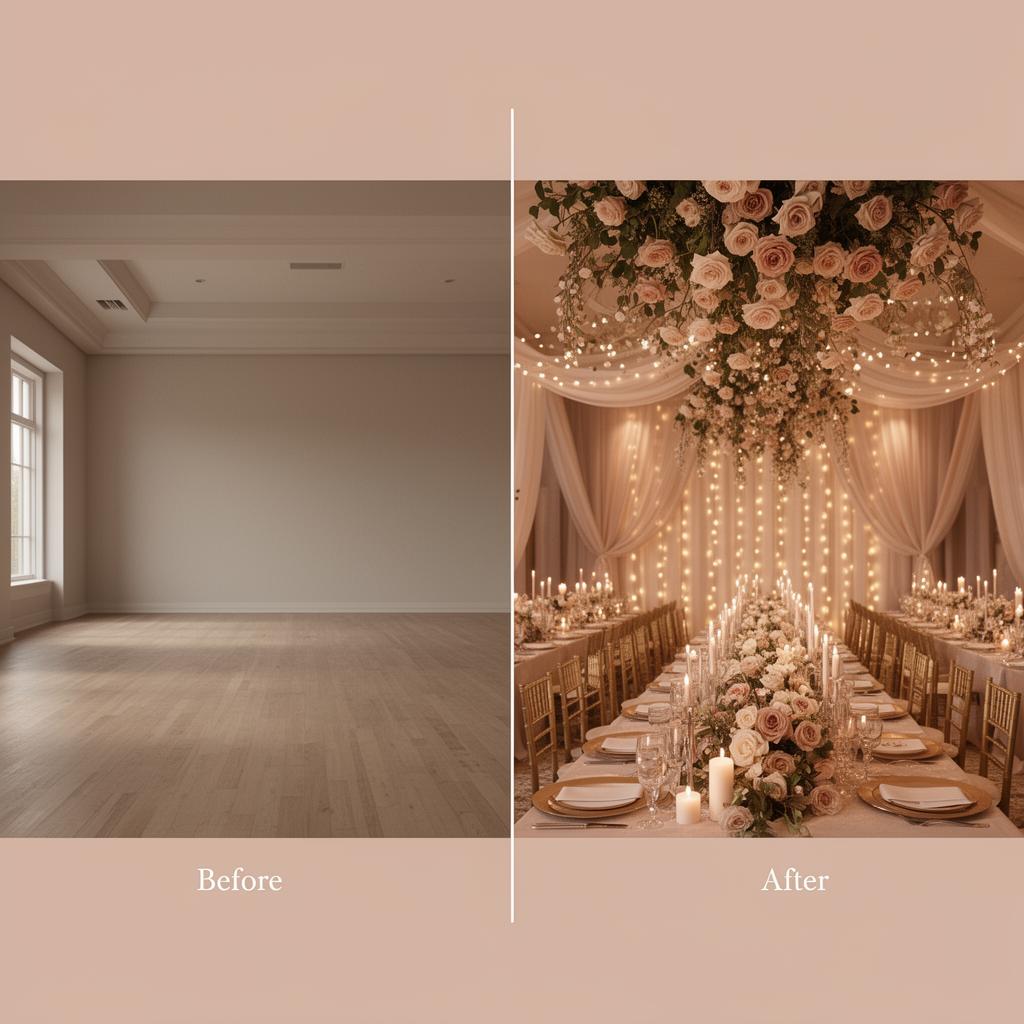
Generated with AI · Real result
From "I do" to done in 4 steps
Getting started takes less than a minute. Here's how it works.
Create your workspace
Set up your wedding with names, date, and currency in under a minute.
Add your details
Import guests, set budgets, add vendors, and build your timeline.
Collaborate & visualize
Invite your partner or planner, and use AI to visualize your venue.
Enjoy the big day
Share the timeline, finalize seating, and let everything run smoothly.
Everything you need, nothing you don't
Powerful tools designed to make wedding planning effortless, organized, and genuinely enjoyable.
Smart Guest Management
Track RSVPs, dietary needs, plus-ones, and custom fields. AI-powered analytics reveal patterns across your entire guest list.
Tasks & Checklists
Import a curated wedding checklist scheduled backwards from your date, then work it in list, board or timeline view.
Online RSVP Forms
Build a branded RSVP form with your own questions and conditional logic. Every answer lands straight in your guest list.
Guest Messaging
Save reusable messages with smart tokens, pick your audience with filters, and send personalised links over WhatsApp or email.
Budget Intelligence
Real-time spend tracking with category breakdowns, payer splits, deviation alerts, and payment timeline views.
Day-of Timeline
Minute-by-minute scheduling with musical moments, vendor cues, and a shareable run-of-show for your entire team.
Vendor Hub
Organize vendors by category with contacts, meeting schedules, notes, status tracking, and budget linkage.
AI Venue Visualizer
Upload your venue photo and let AI transform it with your dream décor, flowers, and lighting — before you commit.
Visual Seating Planner
Drag-and-drop floor plan editor with table shapes, capacity controls, and per-seat guest assignments.
Idea Vault
Collect every idea you want at the wedding, vote on them as a team, and shelve the rest for later.
Document Vault
Store contracts, receipts, and planning documents in organized folders with secure cloud storage.
Collect RSVPs online, straight into your guest list
Design your own RSVP form, send every household a personal link, and watch answers, menu choices and companion names update your guest list in real time — no spreadsheets, no chasing.
Personal RSVP links
Each invitation gets its own private link — no logins, no codes, and answers are already pre-filled with what you know.
Your questions, your rules
Ask about menu choices, transport or the after-party, and show follow-up questions only when the answer calls for it.
Designed like your invitation
Pick a theme, fonts, colours and a cover image — the form is served in your guests' language.
Send it in a couple of taps
Save reusable messages, filter who gets them, and send personalised WhatsApp or email invites with the link inside.
Explore the tools in depth
Dedicated walkthroughs of the features couples and planners use most — see exactly how each one works before you sign up.
For wedding planners
Run every client wedding from one workspace, with shared access and branding.
Guest list app
RSVPs per person, custom fields, dietary needs and instant analytics.
Seating chart tool
Drag guests onto real tables and catch capacity clashes before the day.
AI venue visualizer
Turn a photo of your venue into a styled preview of your dream décor.
Simple, transparent pricing
Planning your own wedding? Pay once. Planning for clients? Choose a studio plan.
Free
Everything you need to plan one wedding.
- 1 wedding workspace
- Up to 150 guests
- Budget tracking
- Vendor management
- Timeline builder
- Seating planner
- 5 free Wedding Visualizer generations
Couple Premium
Not a subscription — no recurring billing.
One payment, unlocked for your whole wedding.
- 1 wedding workspace
- Unlimited guests
- Everything in Free
- 25 AI Venue Visualizer generations
- Need more? $5 for 10 extra generations
- Plan together with your partner (1 collaborator)
- Guest RSVP form with a personal link per guest
Need more AI generations later? $5 for 10 more.
Questions before you sign up?
Quick answers to the things couples ask most.
Is My Wed Hub really free?
Can my partner or wedding planner join me?
How does the AI Venue Visualizer work?
Can I import my existing guest list?
Is my wedding data secure?
Integrations
Connect your favorite AI assistant to help manage tasks, guests, and details for you.