
For professionals

Wedding planning software built for professional planners

My Wed Hub is wedding planning software that keeps every client wedding in its own workspace — guests, budgets, vendors, timelines, seating and AI venue design, all in one place.

Unlimited client workspaces on PRO Invite couples and your team Works on desktop and mobile

Everything a planner needs to run a wedding

One workspace per client

Keep each wedding fully separate, switch between them in a click, and give every couple their own guest list, budget and timeline.

Controlled collaboration

Invite couples, assistants or family with roles, so people see what they need to see without touching the rest of the plan.

Run-of-show timelines

Build minute-by-minute schedules across multiple wedding days, assign owners to each moment, and export a printable PDF for vendors.

Budgets clients understand

Track planned versus real spend by category, record who is paying for what, and surface deviations before they become surprises.

Visual seating charts

Lay out tables on a floor plan, assign individual guests to individual seats, and export the finished chart as a PDF.

AI venue visualization

Show a couple what their venue could look like with different décor, flowers and lighting before anything is booked.

Client weddings on PRO
UnlimitedClient weddings on PRO
Predefined planning tasks to import
45+Predefined planning tasks to import
To switch between client workspaces
1 clickTo switch between client workspaces
Timeline & seating exports for vendors
PDFTimeline & seating exports for vendors

What wedding planning software should actually do

Most planners run their business across a guest-list spreadsheet, a budget spreadsheet, a shared drive, a notes app and endless WhatsApp threads. It holds up until the third simultaneous wedding.

One source of truth per wedding
Guests, budget, vendors, documents, tasks, timeline and seating live in a single workspace — no version checking.
Templates instead of rebuilds
Start each couple from a proven task list and timeline, then adapt the dates rather than starting from a blank page.
Clients inside the plan
Invite the couple with a role instead of emailing PDFs back and forth after every change.
Nothing leaks between weddings
Each workspace is fully isolated, so a change on one wedding can never touch another client's data.

Managing multiple client weddings at once

The hard part isn't any single wedding — it's holding six in your head, each at a different stage.

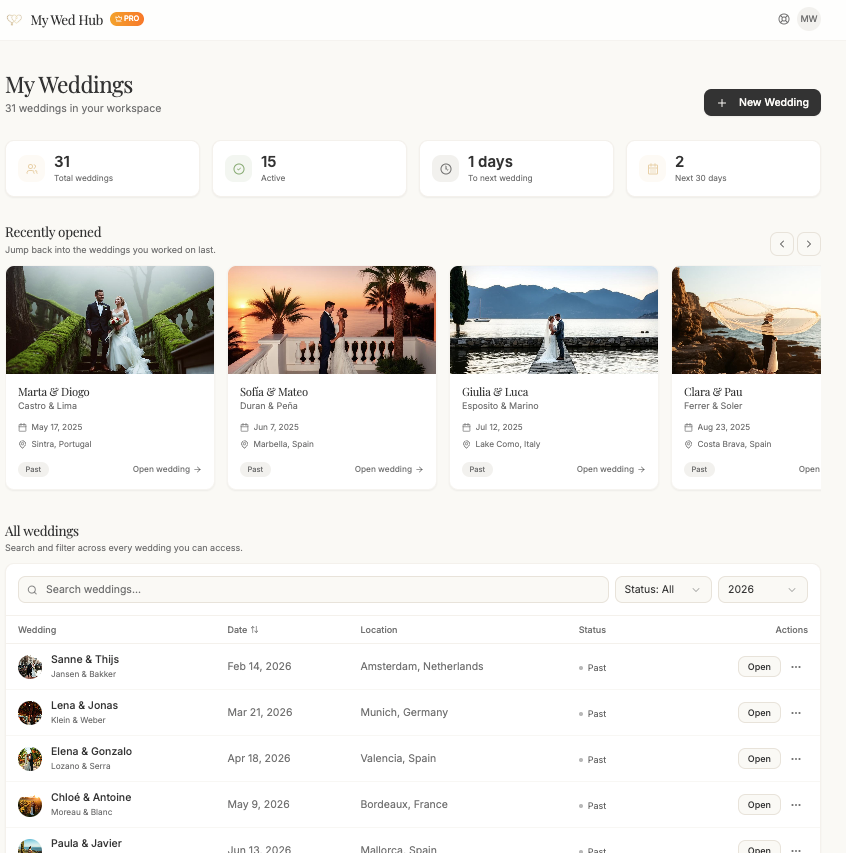
All weddings on one dashboard
See at a glance which wedding has an overdue task, an unpaid deposit, or a date three weeks out.
Task board per workspace
Import 45+ standard planning tasks with due dates, then shift them to each couple's timeline.
Overdue work surfaces itself
Slipping tasks appear immediately on the home screen rather than at the next client call.
Organise your book of business
Group workspaces into sections by year, season or venue — however you already think about your clients.

Guest lists built around invitations, not rows

Real guest lists aren't one person per row. They're invitations: a couple with two kids, an unnamed plus-one, a family of five where only three come to the ceremony.

Invitation groups, person-level answers
One record holds a primary guest plus companions, and each person carries their own menu, transport and attendance answers.
Custom fields of any type
Add the fields this couple actually needs — hotel nights, bus route, ceremony-only — instead of bending a template.
Conditional logic
Fields appear only when a previous answer requires them, so you never ask about a shuttle from someone who's driving.
Confirmation messages in one click
Generate a per-guest summary in their own language, pick which fields to include, and send it straight to WhatsApp.

Timelines, seating and venue design for client meetings

A run of show only works if the venue, band and photographer all hold the same version — and a seating chart only works if it's accurate to the person.

Multi-day run of show
Assign an owner and location to every moment, note musical cues, and export a clean PDF for each vendor.
Visual seating charts
Place tables on a floor plan, drag individuals into individual seats, move table groups together, export to PDF.
Counts that stay correct
Because seats are assigned per person, capacity and dietary summaries update as you go.
AI venue visualization
Show a couple their real venue with different décor, florals and lighting before anything is booked.

Spreadsheets vs. dedicated wedding planning software

Spreadsheets are free and flexible, which is why most planners start there. Here is where they stop scaling once you are running weddings professionally.

  • Multiple client weddings

    My Wed HubOne isolated workspace per wedding, switch in a click

    Spreadsheets & chat threadsA separate file per wedding, opened and version-checked by hand

  • Guest data

    My Wed HubInvitation groups with person-level answers and conditional fields

    Spreadsheets & chat threadsOne row per guest, or one row per group with details squeezed into notes

  • Client collaboration

    My Wed HubInvite couples and assistants with roles that limit what they can change

    Spreadsheets & chat threadsShare the file and hope nobody overwrites a column

  • Seating

    My Wed HubVisual floor plan with per-seat assignments and PDF export

    Spreadsheets & chat threadsManually drawn diagram redone after every change

  • Budget tracking

    My Wed HubPlanned vs. real spend by category, with payer breakdown

    Spreadsheets & chat threadsFormulas that break when a row is inserted

  • Timeline for vendors

    My Wed HubMulti-day run of show exported as a printable PDF

    Spreadsheets & chat threadsA document rewritten and re-sent for every revision

Frequently asked questions

Yes. My Wed Hub was designed for planners running several weddings at once. Each client wedding lives in its own workspace with separate guests, budget, vendors, documents, tasks, timeline and seating plan, and the PRO plan includes unlimited workspaces.

Bring every client wedding into one hub

Start free with a single workspace, then upgrade to PRO for unlimited weddings, unlimited guests and AI venue visualization.